
 AI Agent
Training Your Bot
Add knowledge sources - help articles, Q&A snippets, web pages, and uploaded files - then run Train AI to embed them so Cove AI can answer from them.
Cove AI answers only from knowledge you provide. Before it can help your customers, you need to give it sources and train it.
Go to Cove AI in the left nav, pick your app, then open Training.
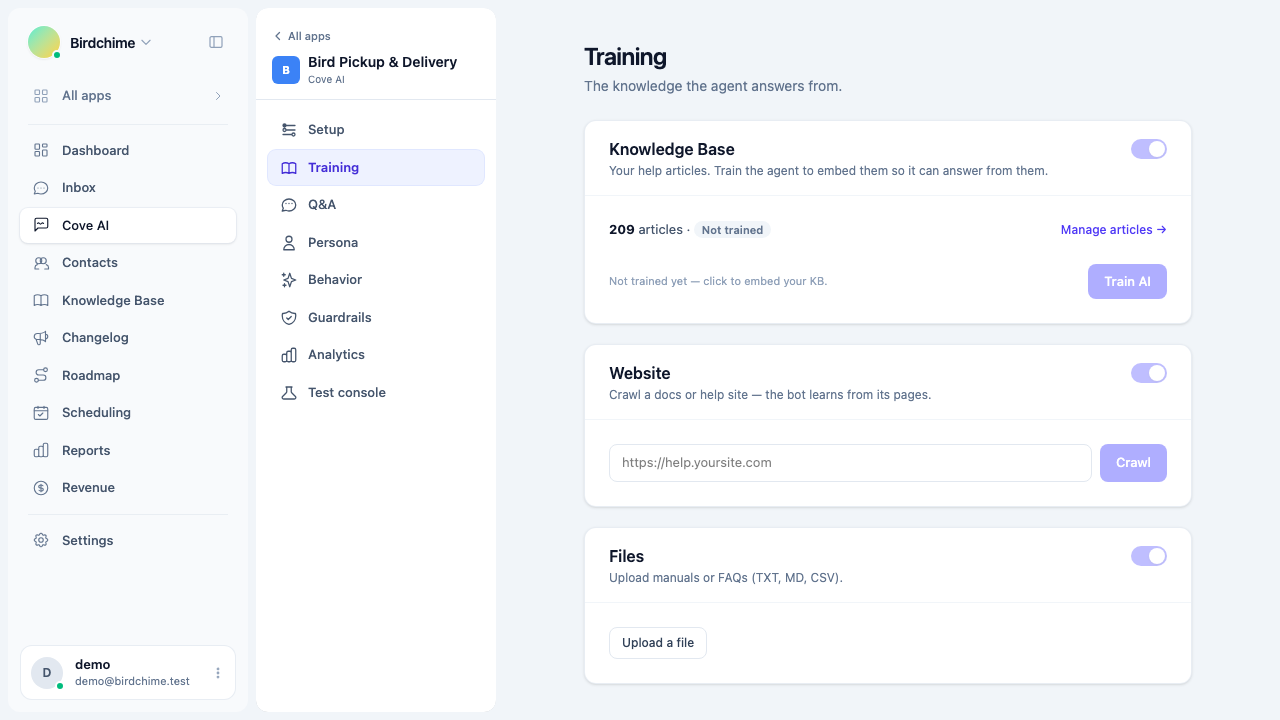
Knowledge sources
There are four types of sources. Each can be toggled on or off independently.
Knowledge base (help articles)
Your help center articles are the primary source. When you publish or update an article, Convot automatically re-embeds it in the background - you do not need to retrain manually for every edit.
To embed all existing articles at once, click Train AI in the Training section. The button changes to Re-train after the first run.
The training status badge shows:
- Trained - articles are embedded and ready.
- Training - the embedding job is running. The test console unlocks when it finishes.
- Not trained - no embedding run has completed yet.
Your knowledge base also powers the AI agent. Writing a good help article improves the bot’s answers for the same topic automatically. See Creating an article.
Web pages
Add a URL to crawl an existing docs site, support page, or marketing page. Convot fetches the page, strips it to plain text, and chunks it for retrieval.
- Paste a URL in the Website field and click Crawl.
- The crawled page appears in the list with an indexed, pending, or failed status.
- Remove a page at any time - its chunks are deleted immediately.
Only add pages you own or have the right to use. The crawl is a one-time fetch; it does not stay in sync automatically.
Uploaded files
Upload plain-text documents such as FAQs, internal notes, product specs, or CSVs. Accepted formats: .txt, .md, .csv.
- Click Upload a file and pick your file.
- It appears in the list once processing completes.
- Remove a file to delete its chunks from the index.
Q&A snippets
Q&A snippets are hand-written question-and-answer pairs. They are always in scope regardless of the Knowledge Base, Web, and Files toggles, because they are managed on the Q&A tab, not here.
See Q&A snippets for how to write them.
Triggering a training run
You do not need to retrain after every change:
- Articles re-embed automatically when you publish or edit them (if the bot is enabled).
- Web pages are embedded when you add them.
- Files are embedded on upload.
Click Train AI (or Re-train) when you want to re-index everything from scratch - for example, after a bulk update to your help center.
Checking the index
The Training section shows the total chunk count next to the training status. A chunk is a short passage the bot retrieves at answer time. More chunks mean more coverage, but quality matters more than volume - one well-written article is worth more than five vague pages.
Testing after training
Once the status shows Trained, use the Test console (in the sidebar) to ask questions the way a customer would. You can see whether the bot answers, what confidence score it returns, and which sources it used. See Q&A snippets to tune specific answers.
Was this article helpful?
Thanks for your feedback!