
 AI Agent
AI Agent Analytics
The AI agent analytics dashboard shows deflection rate, CSAT, cost, handled volume, daily activity trends, suggest-mode trust data, and knowledge gaps.
The AI agent analytics dashboard gives you a full picture of how the bot is performing. Open it at Cove AI - Analytics.
Date range
Use the 7d, 30d, or 90d shortcuts, or pick a custom range with the date pickers. All stats update to match the selected window.
Hero stats
Four cards appear at the top of the dashboard, each with a comparison to the previous period of the same length.
| Stat | What it measures |
|---|---|
| Deflection | Percentage of handled conversations the bot answered without escalating |
| Handled | Total conversations the bot touched (answered + escalated) |
| CSAT | Customer satisfaction: % of feedback responses marked “helpful” |
| Cost | Total bot spend in USD for the period |
A downward arrow on Cost is good. A downward arrow on Deflection or CSAT means the bot is doing worse than last period and is worth investigating.
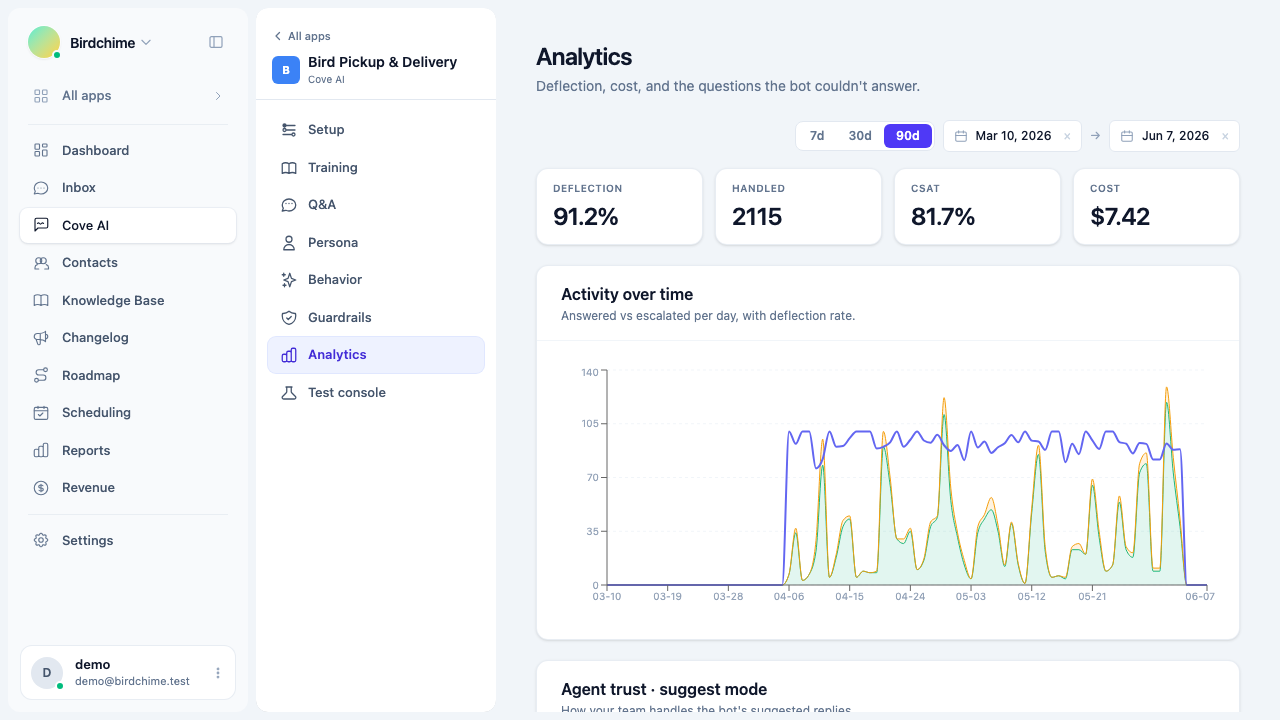
Activity over time
The area chart shows answered vs escalated counts per day and the deflection rate (%) as a line. Use this to spot:
- Spikes in escalated (a new type of question the bot is not trained on).
- Days where deflection dropped (content changes, new product features customers are asking about).
- Overall volume trends.
Suggest-mode trust funnel
If you are running in Suggest mode, a second card shows how your agents handled the bot’s drafts over the selected period:
- Accepted - sent as-is.
- Edited - agent tweaked it before sending.
- Rejected - agent discarded the draft and wrote their own reply.
The acceptance rate is accepted + edited as a percentage of all actions. When this reaches 80% or higher across at least 20 interactions, Convot shows a graduation nudge suggesting you try Auto when offline mode. See Suggest mode vs auto-reply.
Knowledge gaps
Below the charts is the Knowledge gaps card. It clusters recurring unanswered or poorly-answered questions so you can prioritize what to document next.
See Knowledge gaps for a full walkthrough.
Role access
The AI agent analytics are part of the main analytics section. Only organization owners and admins can view analytics by default. Agents do not see reports unless their permissions are explicitly enabled.
Was this article helpful?
Thanks for your feedback!