
 AI Agent
Knowledge Gaps
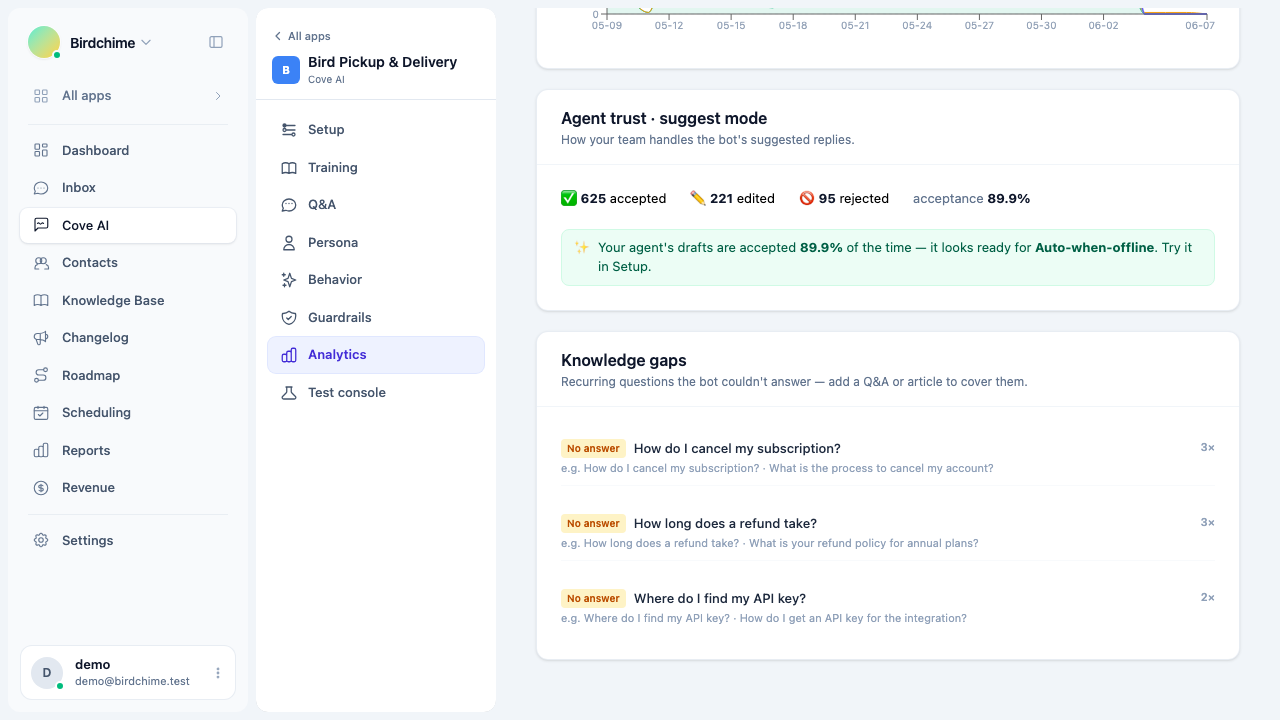
The Knowledge gaps report surfaces recurring questions the AI agent could not answer, clustered by topic so you know exactly what to document next.
No matter how good your training data is, customers will ask things you have not covered yet. The Knowledge gaps report tells you exactly what those things are.
It is in Cove AI - Analytics, in the Knowledge gaps card below the main charts.
What it shows
The report looks at recent conversations where the bot either:
- Escalated because it had no confident answer (no answer gaps), or
- Answered but the customer marked it as unhelpful (weak answer gaps).
It filters out noise: bare greetings, thank-you messages, requests for a human, and automated messages are excluded. What remains is clustered by semantic similarity, so if 15 customers asked variations of “does your app support multiple locations?”, you see one cluster labeled with the most representative phrasing, not 15 separate entries.
Only clusters with 2 or more customers appear - one-offs are ignored. The result is an actionable shortlist of what to document.
Gap types
| Type | What it means |
|---|---|
| No answer | The bot escalated - the knowledge base does not cover this topic at all |
| Weak answer | The bot answered but customers found it unhelpful - the coverage exists but is incomplete or inaccurate |
“No answer” gaps are the highest priority: the bot is completely blind on this topic. Fix them first by adding a Q&A snippet or writing a help article.
“Weak answer” gaps mean you have something but it is not good enough. Edit the relevant article or Q&A snippet to improve coverage.
Acting on gaps
For each cluster:
- Look at the sample questions listed under the cluster label to understand exactly what customers are asking.
- Decide whether to fix it with a Q&A snippet (fastest, most precise) or a help article (better for long-form how-tos).
- Add or update the content.
- The bot picks up the new content automatically - no retraining required for Q&A snippets; for articles, re-embedding happens in the background when you publish.
A Q&A snippet is usually the right tool for a no-answer gap. An article is better when the answer needs context, screenshots, or step-by-step instructions that would also benefit customers browsing your help center.
Why the report loads separately
The gaps analysis is slower than the rest of the analytics dashboard because it runs semantic clustering on recent conversations. It loads after the main metrics so the hero stats appear immediately.
Was this article helpful?
Thanks for your feedback!