
 Your Account
Choose how contacts are named
Show customers by their name, company or store name, domain / ID, or email across your inbox and your notifications.
A long list of domains like acme-store-22.myshopify.com is hard to scan. With Show contacts as, you choose which detail Convot uses to name each customer, so the inbox reads the way your team thinks about customers.
This is a personal setting. Changing it only affects what you see, and each teammate can pick their own.
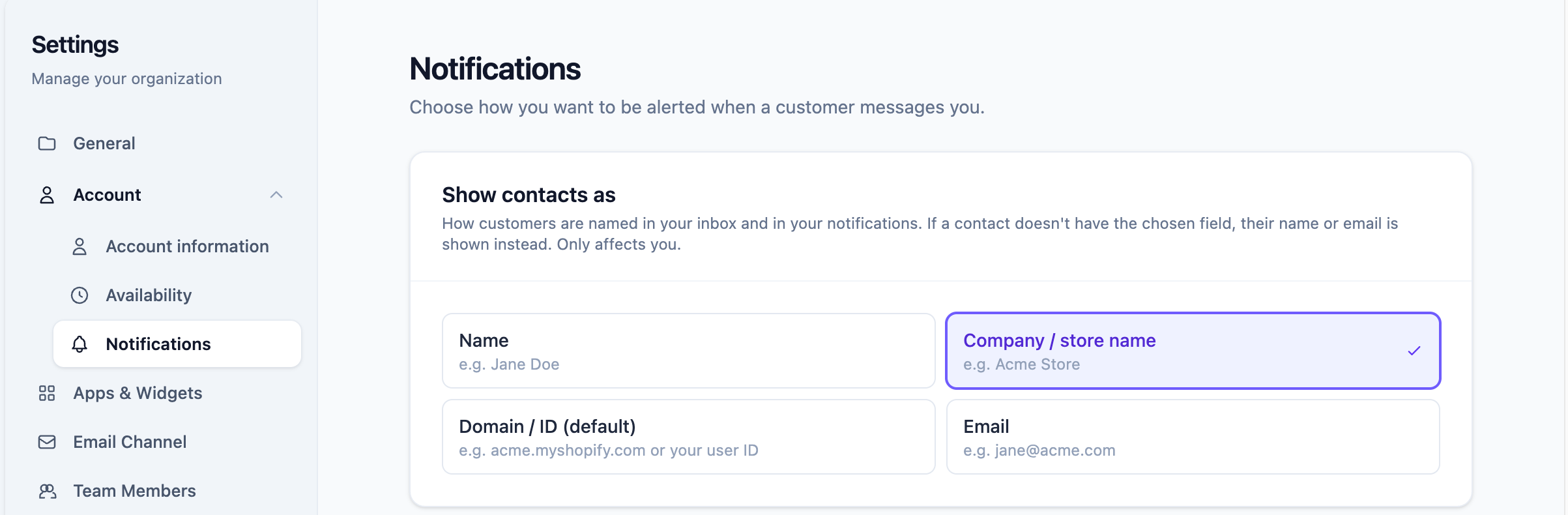
Change the setting
- Go to Settings > Account > Notifications (
/settings/account/notifications). - Under Show contacts as, click the option you want.
The change saves instantly and your inbox updates right away. No page refresh needed.
The options
| Option | What you see | Example |
|---|---|---|
| Domain / ID (default) | The contact’s Shopify store domain if one is linked, otherwise the ID your app sends to Convot |
acme.myshopify.com or user_8812
|
| Company / store name | The contact’s company, or their Shopify store name if they are a Shopify merchant | Acme Store |
| Name | The contact’s name | Jane Doe |
| The contact’s email address | [email protected] |
If a contact doesn’t have the detail you picked, Convot falls back to their name, then their email, so no one ever shows up blank.
Domain / ID is the default because it matches how Convot labeled contacts before this setting existed. You don’t have to change anything unless you want to.
Which option should I pick?
- You sell a Shopify app and your team remembers merchants by store name: pick Company / store name. Convot uses the store name it syncs from your Shopify Partner account, so it works even when your app only sends the store domain.
- You sell a Shopify app and your team searches Shopify admin or logs by domain: keep Domain / ID.
-
You sell to businesses (B2B): pick Company / store name and send the
companyfield when you identify visitors. - You sell to individuals: pick Name.
Where it applies
Your choice is used everywhere Convot names a customer for you:
- The inbox list, the conversation header, and the contact sidebar
- The Contacts and Visitors lists and contact profiles
- Desktop notifications for new messages
- Mobile push notifications for new messages, assignments, and frustrated-customer alerts
- Emails Convot sends you about new messages, assignments, @mentions, and escalations
- The Dashboard and Reports

Slack notifications always use the contact’s name. They post to a channel your whole team shares, so they can’t follow one person’s setting.
FAQ
Does this change any customer data? No. It only changes which existing detail is shown. The contact’s name, email, company, and domain stay exactly as they are, and customers never see this setting.
Why do I still see a domain after picking “Company / store name”?
That contact has no company and no Shopify store name, so Convot falls back to their name. Many Shopify apps send the store domain as the name, so that’s what appears. To fix it for your whole account, send a company value when you identify visitors, or make sure the contact’s Shopify store domain is linked.
My teammate sees different names than I do. Is that a bug? No. Each agent picks their own option. Ask your teammate which one they chose under Settings > Account > Notifications.
Was this article helpful?
Thanks for your feedback!